DSLR Live View can be painfully slow, but here’s a simple workaround that changes everything
If you like composing images on a screen rather than in a viewfinder, then there’s no doubt that mirrorless cameras do it better than DSLRs. With DSLRs you have to switch to a live view mode with a sensor-based AF system which is so much slower that many users just won’t bother.

If you like composing images on a screen rather than in a viewfinder, then there’s no doubt that mirrorless cameras do it better than DSLRs. With DSLRs you have to switch to a live view mode that locks up the mirror and switches the camera to a sensor-based AF system which is so much slower that many users just won’t bother.
Canon did introduce its Dual Pixel CMOS AF system on later DSLRs, which made them almost as fast at focusing in live view as mirrorless cameras of the time. Nikon, though, stuck with slow contrast AF, right up until the D780.
So if your DSLR offers painfully slow live view AF, what can you do about it? Well here’s a simple workaround that changes the way you focus, but often in a very constructive way.
Using back-button AF with live view
The issue with live view AF is that it’s just too slow. There’s really no getting around that. But, very often, you don’t need to keep refocusing between shots. By default, cameras are set up to trigger the AF with half-pressure on the shutter release – and with slow DSLR live view focusing, that’s the last thing you need.
The fact is, in many situations you only need to focus once. You might have the camera on a tripod for a still life or a studio setup, you may be shooting a landscape with your main subject a fixed distance from the camera – you might even be doing street photography using zone focusing.
This is the tiresome thing about the way cameras are set up. They check and adjust the focus for every shot, whether they need to or not. And it’s this continual re-focusing that causes much of the pain of slow DSLR live view AF.
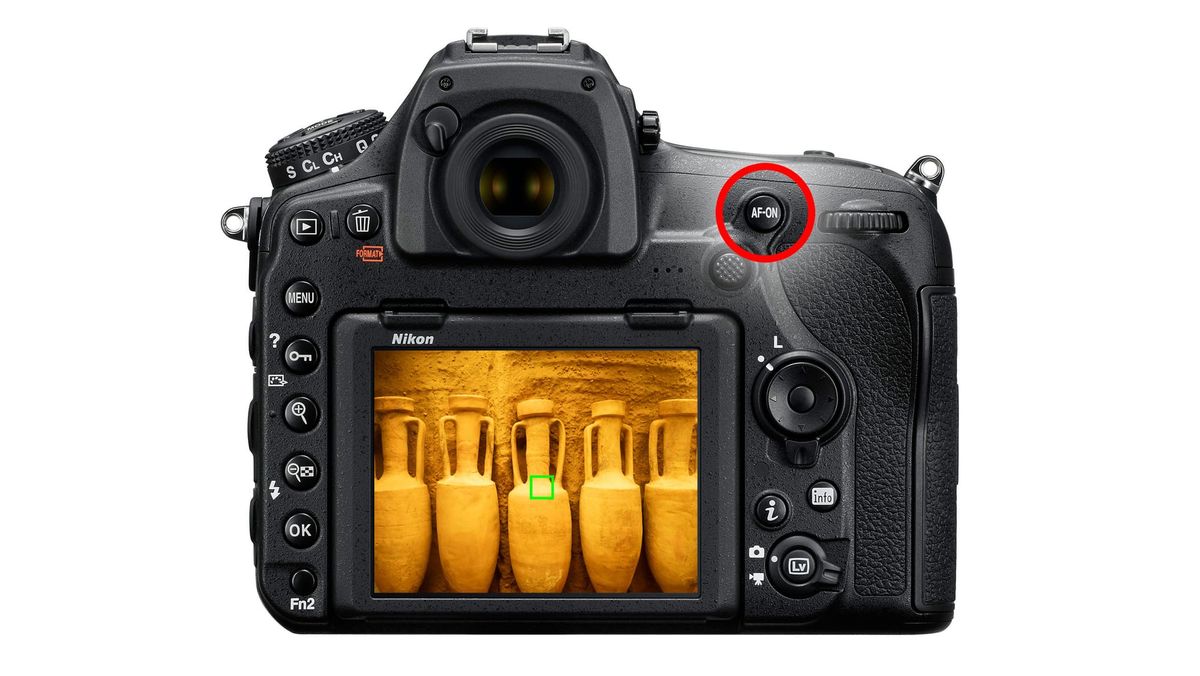
The way around this is to switch to back-button focusing. Some cameras have AF-ON buttons that activate the AF system. On cameras that don’t, you can customize the AE-L/AF-L button to activate the AF instead of locking the exposure and focus.
There’s a second step you have to take. You need to go into the camera’s custom settings again and disable the shutter release’s autofocus activation. You may need to check the manual, or you may know how to do this anyway.
Now, when you press the shutter release, the camera takes a picture. No delay, no focusing. Focusing is carried out separately by the AF-ON button (or AE-L/AF-L) button, typically near your right thumb as you hold the camera.
It can take a little while to train your reflexes to shoot in this way, but once you’ve learned it you’ll see the advantage of disconnecting the shutter release from autofocus activation. Now, when you’re in live view, you only focus, or re-focus, when you need to – the camera won’t insist on doing it every time you try to take a picture.
It won’t make slow live view AF any faster, but it will mean you only focus when you need to, not for every single shot you try to take.